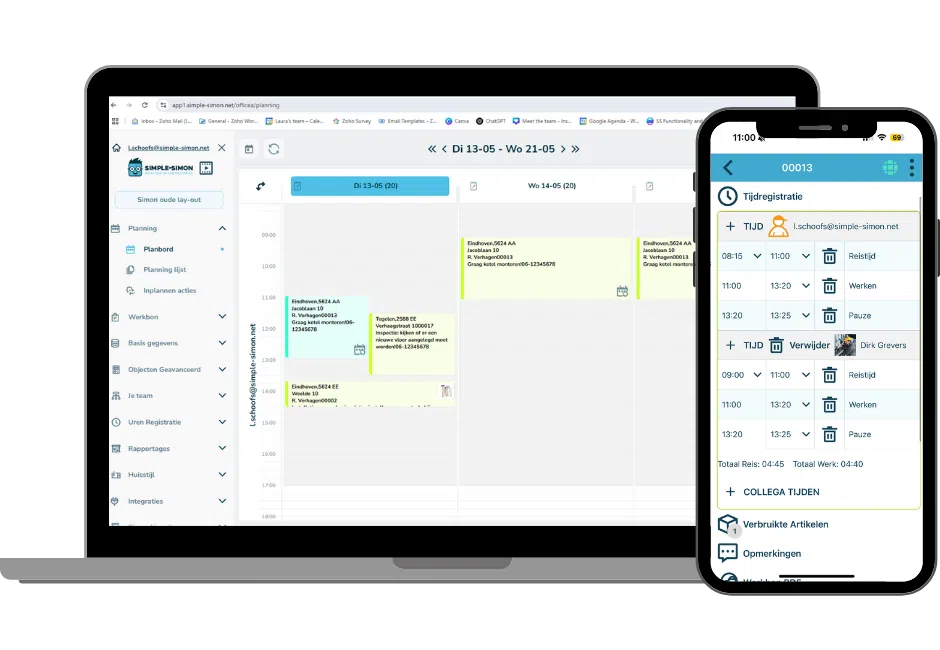
Register Timesheets in Our App

Your technicians work hard all day, but the real work often starts afterwards: retyping hours, categorising work types and collecting paperwork. And if a customer questions the invoiced hours, you have no proof.


With Simple-Simon, your technicians complete their timesheets directly in the Job sheet app, immediately after finishing a job and while still on-site. You receive the hours instantly in the office, approve them and always have a complete and accurate record.

Complete Timesheets in the Field

After completing a job, your technician opens the app and fills in their timesheet: working hours, travel time, breaks and the correct work type code. Whether it concerns regular work, overtime, public holidays or work performed without a job sheet, everything is recorded directly on their smartphone  even without an internet connection.

They digitally sign their timesheet and submit it with a single tap. Time tracking automatically runs in the background once they start a job sheet. For emergency call-outs or work without a job sheet number, they can simply add a code to ensure every worked hour is correctly recorded.

Automatic Time Tracking and Flexible Work Types

You decide which work types exist within your business. Examples include regular hours, overtime (100%, 130%), weekend allowances, travel time, holiday leave, sickness or public holidays. Each work type can be linked to a code, ensuring hours are automatically allocated to the correct cost category.

Work types linked to a job sheet number, such as regular work or overtime, are automatically connected to the correct job. Work types without a job sheet number, such as public holidays, sickness or internal training, are recorded separately to ensure all worked and non-worked hours are correctly processed for payroll.

The registration is always visible to the technician, the planner in the office and the payroll department. No manual data entry and no corrections afterwards.

Review and Approve Timesheets from the Office

As soon as a technician submits their timesheet, it becomes instantly available in the office module. You review the hours, adjust work types or times if necessary and approve the timesheet in just a few clicks.

An approved timesheet becomes a reliable and verifiable record containing all registered working hours, work type codes and, optionally, a digital signature.

Edit and Adjust Timesheets After Submission

Did a technician select the wrong work type or forget to register an hour? You can easily adjust this directly from the office module before the timesheet is finally approved.

Modify hours, change work type codes or add missing registrations. The updated timesheet becomes immediately visible to both the technician and payroll administration, ensuring your records always remain accurate.

Reports and PDF Timesheets

Generate reports directly from the office module per employee, date or period. Filter by technician, week or month and export an overview containing all approved hours, work types and additional notes.

You can export PDF timesheets containing all relevant information, including working hours, travel time, breaks, work type codes and digital signatures. These PDFs can be used for payroll administration, customer invoicing or as proof during time audits.

Everything is filtered and immediately available without manually combining spreadsheets or paper forms.

Benefits of Digital Timesheets for Your Field Service Team

Companies that switch to digital timesheets with Simple-Simon notice the difference :

  • Technicians complete timesheets directly on-site after finishing a job. No retyping and no forgotten hours at the end of the week.
  • You always maintain an accurate registration with the correct work type codes, including overtime, travel time and special situations such as public holidays or sickness.
  • Approve timesheets quickly from the office. In case of disputes about invoiced hours, you immediately have proof in the form of an approved timesheet with a digital signature.
  • Payroll teams work with approved PDF timesheets without manual consolidation or corrections.
  • Technicians can continue working offline. Time tracking continues in the background and synchronises automatically when an internet connection becomes available.

Who Are Digital Timesheets for?

Simple-Simon is designed for SMEs with field service teams that register and approve hours daily. The timesheet module is widely used by installers, plumbers, electricians, roofers, landscapers, security companies and maintenance businesses.

Working with subcontractors or freelancers? Licences can be shared flexibly on a monthly basis, so you only pay for active users. Your subcontractors complete their timesheets through the app while you approve them from the office.

The solution is also ideal for international teams. The app supports multiple languages and time registration automatically takes travel time across borders into account.

How Do Timesheets Work in Simple-Simon?

Four simple steps from recorded hours to approved timesheets:

  • Your technician starts their workday through the app. Time tracking automatically runs in the background as soon as they open a job sheet. They add travel time, breaks and work type codes as they occur.
  • At the end of the day, they complete their timesheet, add notes where required and submit it digitally. This also works without an internet connection.
  • You immediately see the submitted timesheet in the office module, review the hours, make adjustments if required and approve it with a single click.
  • Export a PDF timesheet or monthly report for payroll processing.

Frequently Asked Questions About Digital Timesheets

What are digital timesheets?

A digital timesheet is an electronic overview of an employee’s worked hours for a specific day. Your technician completes the timesheet through the app, including working time, travel time, breaks and work type codes. You then review and approve the timesheet from the office.

What is the difference between a timesheet and a job sheet?

A job sheet describes a specific job performed for a customer, including the work completed, materials used and hours spent on that job. A timesheet provides a complete overview of all hours worked by an employee during a day, including activities without a job sheet number such as travel time, leave or internal work.

Can I complete timesheets without an internet connection?

Yes. Time tracking continues running in the background, even without an internet connection. Your technician completes and submits the timesheet through the app, and all information synchronises automatically when a connection becomes available.

How does timesheet approval work?

Once a technician submits a timesheet, it becomes instantly visible in the office module. You review the hours, make adjustments if necessary and approve it with a single click. The approved timesheet is automatically stored and can be exported as a PDF for payroll administration.

Which work types can I configure in Simple-Simon?

You can configure work types that match your business processes, such as regular hours, overtime (100%, 130%), weekend allowances, travel time, leave, sickness and public holidays. Each work type can be linked to a booking code so hours are automatically allocated to the correct cost category.

How much does the timesheet module cost?

The time tracking module is available as an add-on for €10 per user per month, in addition to the base subscription of €30 per user per month. No contracts and no minimum number of users required. Try it free for 14 days.

Optimise Your Time Tracking by Completing Timesheets Digitally in the Field with the Simple-Simon App

Looking to streamline your time registration and save valuable time? With the Simple-Simon app, your technicians can easily complete timesheets wherever they are. No paperwork and no delays — simply record hours directly in the app and maintain a fast and accurate administration process.

Interested in a demo? Contact our sales team and discover how Simple-Simon can improve your workflows.

Optimise Time Tracking by Filling in Timesheets in the Field with the Simple-Simon App

Want to streamline your time registration and save valuable time? With the Simple-Simon app, you can easily complete timesheets on-site—wherever you are. No more paperwork or delays: log your working hours directly via the app and ensure a fast, accurate administration process.

Interested in a demo? Contact our sales team to discover how we can improve your workflow.

Plan a live demo

Start today with Simple-Simon

Plan a demo or start a 2 week trial

Complete for €30  per month, per user

Try for freeStart a demo

“Our company has been using this app for a very long time, and now with the new 3.0 version, it works even better. Thanks a lot!”

Aktie Totaalinstallateurs B.V.

★★★★★
★★★★★
4.8/5 rated