


Gebruiker werkt met de Simple-Simon software en bekijkt een digitale planning op een touchscreen.

Asset Management Like a PRO

With Simple-Simon Asset Management PRO, every installation you maintain gets its own complete record: type, serial number, location, warranty, documentation and full service history.

Link your service schedule to the asset type, and Simon calculates when maintenance is due and prepares the job sheets for you. All you need to do is confirm and assign the work.


Dashboard voor urenregistratie en goedkeuring van gewerkte uren in de Simple-Simon werkbonsoftware.

All asset information in one place,

even in the field

An engineer visiting a customer for the first time often starts by searching. What type of asset is installed? What was done during the last visit? Is it still under warranty? That information may be stored in a folder, a spreadsheet or simply in someone’s head.

In Simple-Simon, every asset has its own record with the type, serial number, location, warranty date, documentation and complete maintenance history. Your engineer scans the QR code or barcode on the asset and instantly has all the information on their phone — even without an internet connection. Back at the office, you’re looking at the same record.

This makes you less dependent on who is out in the field that day. New engineers can get up to speed faster, and valuable asset knowledge stays within your company when someone leaves.
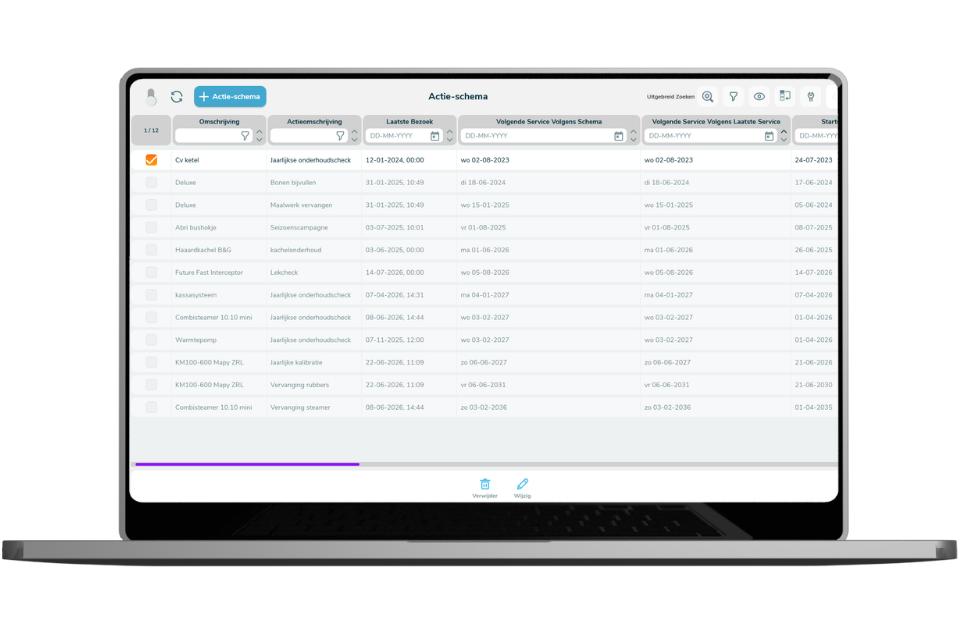
Service schedules that don’t just live in someone’s head

Cables after six years, seals after three, an inspection every spring. Your team knows the rules. But if no system applies them automatically, someone still has to manage it manually every time.

For each asset type, you define which actions are required, how often they need to be carried out and which checklist applies. Simon calculates what maintenance is due for the period you select and prepares the job sheets, grouped by location so your engineer can complete multiple jobs in a single visit. You review the proposal, confirm it and assign the work to your team.

Want to involve your customer? Send the proposal by email and see in Simon who has approved it and who hasn’t yet. For customers you prefer to call yourself, you can simply skip that step.

Asset management that also pays off in your revenue

Most service companies don’t have a complete overview of all the assets installed at their customers’ locations. As a result, some assets fall outside the maintenance contract, even though you still send an engineer when something goes wrong. That means you’re doing work without billing for it on a recurring basis.

With a complete asset list, you can see exactly which assets are covered by contract for each customer and location — and which aren’t. Materials used are recorded directly against the asset, so you can see what an installation is really costing you. You also have the information you need to support conversations about expanding the service contract.

It works the same way for your customer. Completed actions, service history and materials used are all recorded per asset, so you can show exactly what has been done instead of simply telling them.

What asset management software delivers for your business

  • You define maintenance rules once per asset type, so they no longer depend on who has them in their head.
  • You can see which assets are covered by contract for each customer and which aren’t, so you don’t give away recurring maintenance for free.
  • Your engineer has the asset history, documentation and checklist on their phone, even without an internet connection.
  • You receive a maintenance proposal for each period that you only need to confirm and assign.
  • You record materials and hours against the asset, so you know what an installation is really costing you.
  • You build a complete record for each asset, allowing you to show your customer exactly what work has been carried out.
Gebruiker maakt een serviceticket aan in het Simple-Simon klantportaal op een laptop.

Your customer reports the issue directly on the right asset

A service request without an asset is just a piece of free text. Someone in the office still has to work out which installation it refers to, where it is located and what was done to it last time. With the Customer Portal, your customer does that themselves. They scan the QR code on the asset or look it up in their own overview, and the ticket is linked directly to the right asset, including its history and documentation.

That’s how the two modules strengthen each other. Your asset register makes every service request more complete, while each completed request automatically adds to the asset’s history without anyone having to update it afterwards.

Your customer only sees their own assets. For each customer, you decide who can see what — whether that is a head office with ten locations or a subcontractor who only works at one site.

Learn more about the Customer Portal PRO module.

Curious?

Curious how Simple-Simon and our PRO modules can make your field service even more efficient? Don’t wait any longer — book a demo today and discover the benefits for yourself.

Already a customer? Get in touch with us and we’ll show you why our PRO modules are the next step towards gaining even more control over your field service.

Plan a live demo Get in touch

Frequently asked questions about Asset Management PRO

Start today with Simple-Simon

Plan a demo or start a 2 week trial

Complete for €30  per month, per user

Try for freeStart a demo

“Our company has been using this app for a very long time, and now with the new 3.0 version, it works even better. Thanks a lot!”

Aktie Totaalinstallateurs B.V.

★★★★★
★★★★★
4.8/5 rated