Bezoekers krijgen een live demonstratie van de Simple-Simon buitendienstsoftware op een vakbeurs.

Report a service issue like a PRO

The phone rings: something is broken. You copy the details into a job sheet and call back twice because you still need to know which device it is and what exactly is wrong.

With Customer Portal PRO, your customer reports the issue themselves. They scan the device, complete a short questionnaire and add a photo. A complete job sheet is ready for you, linked to the right asset. No retyping, no calling back.

Klantportaal voor buitendienstsoftware waarin klanten zelf werkbonnen, onderhoudshistorie en meldingen kunnen bekijken.

Filax enabled the Customer Portal. Now their customers submit their own service requests.

Monteur maakt een foto van een installatie met een tablet voor digitale inspectie en werkbonregistratie.

Your engineer knows what to expect before heading out

Your customer can add a photo, video or document directly to their service request. The nameplate, the error code on the display, or the exact spot where the water is coming from.

Your engineer knows what to expect before heading out. They can bring the right part instead of having to make a second trip, and they know which tools they’ll need. Every job completed in one visit saves you half a day of wasted time.

And you no longer need to call back just to find out what exactly is wrong.
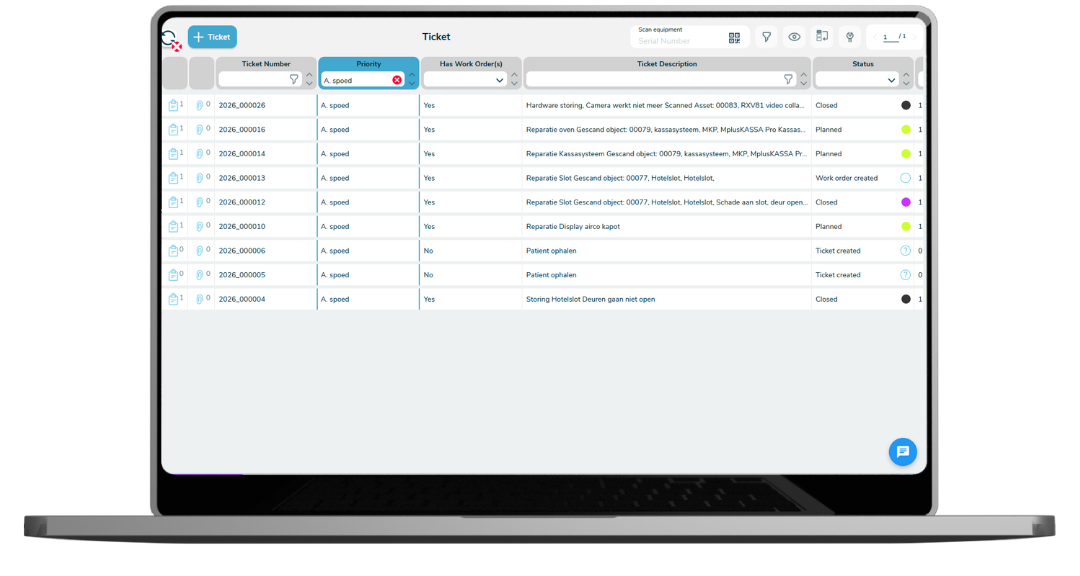
Ticketbeheer software voor storingen, serviceverzoeken en werkbonnen in de buitendienst.

Three ways to report an issue, every time with a complete job sheet

Your customer chooses how they want to report an issue, and all three options come in as a job sheet you can act on straight away.

They scan the sticker on the device or look it up in the portal. The request is then linked directly to the right asset, with the full service history underneath.

Not working with assets? Then they can start a general service request for their work address. The questionnaire still guides them through everything you need to know.

Or they can simply send an email to the support address they already use. Simon reads the email and creates a draft job sheet from it. Your customer doesn’t need to learn anything new, and you don’t need to retype anything.

What comes in is a draft. Simon prepares it, you confirm it and schedule the work. If you want certain requests to be scheduled automatically, you can do that too — but only if you choose to, not by default.

Chatfunctie voor communicatie tussen klant, planner en monteur binnen de Simple-Simon werkbonsoftware.

All communication in one place

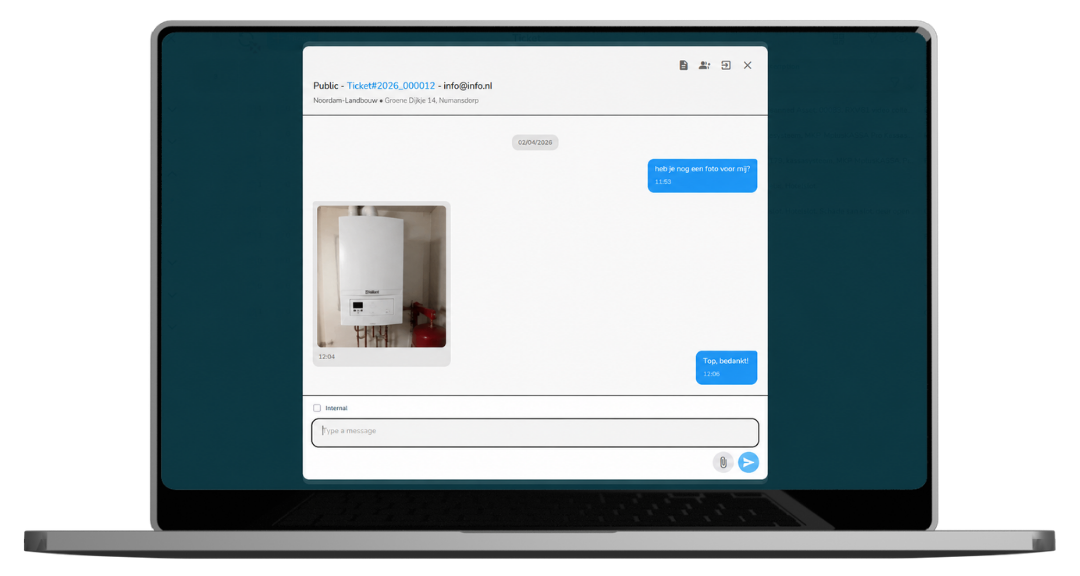
Every service request includes a chat. Your customer asks if the visit can be moved back a day, you ask whether the installation has been switched off, and they send another photo. Everything stays with the service request — not in the inbox of one colleague who happens to be off that day.

Your customer is notified as soon as you reply, and you see their response directly in the job sheet. The engineer heading there tomorrow sees the same agreements and information.

No more email chains that nobody can find, or WhatsApp conversations where half the agreements are buried.

Monteurs bekijken een digitale werkbon op een tablet tijdens een buitendienstklus.

Show in black and white what your service is worth

When it’s time to renew the contract, you may have a customer who feels your service “could have been faster.” Without the data, all you can do is say that your experience is different. With the reporting in the portal, you can show what actually happened.

For each asset, you can see the uptime. For each service request, you can see the response time and how long it took to resolve. And across the entire period, you can see what percentage of requests were handled within the agreed SLA.

Your customer sees the same figures you do. That’s not only useful proof during a contract renewal — it also helps you justify a higher rate against a competitor whose only advantage is being cheaper.

Goederenontvangst en logistieke registratie met werkbonsoftware in een magazijn.

From branch office to headquarters, everyone gets the right level of insight

Large customers aren’t just one person. The branch manager in Tilburg should be able to report an issue for their own location without seeing anything from the branch in Liège. The manager above them, on the other hand, wants an overview of all locations side by side, including reporting across the entire organisation.

You configure this per customer, right down to location level. You decide who can see which assets, who can create service requests, who can view job sheets and forms, and who has access to the reporting.

That way, you give larger customers the transparency they expect without showing them anything they don’t need to see.

Planner gebruikt een digitaal planbord om werkzaamheden en monteurs te plannen.

What you get from it

  • Your office handles fewer phone calls because customers can check the status themselves.
  • You no longer have to retype service requests because every request comes in as a job sheet.
  • Your engineer makes fewer repeat visits because they know what to expect before heading out.
  • You no longer have to search for what was done last year because it’s all stored with the asset.
  • You can justify your rates with data on response times and resolved service requests.
  • Your customer doesn’t need to install anything, and you don’t need to have anything custom-built.

Frequently asked questions about Customer Portal PRO

Start today with Simple-Simon

Plan a demo or start a 2 week trial

Complete for €30  per month, per user

Try for freeStart a demo

“Our company has been using this app for a very long time, and now with the new 3.0 version, it works even better. Thanks a lot!”

Aktie Totaalinstallateurs B.V.

★★★★★
★★★★★
4.8/5 rated