



Simple-Simon team in gesprek met bezoekers tijdens de Afbouw Vakdagen.

Work efficiently like a PRO

An installation or a service issue: different form, different duration, different message to the customer. Yet someone in the office still has to find the right paperwork for every job sheet. Or forgets it altogether.

With Job Sheet PRO, you set this up once using job sheet types. The right forms, standard duration, PDF layout and customer email are all linked to the type. By linking skills to a job sheet type, you also make sure the right engineer is assigned to the right job. Whoever creates the job sheet only needs to select the correct type.

No searching, no forgotten forms and less chance of planning mistakes.

Try for free Contact sales


Servicemonteur bij bedrijfswagen op weg naar een klant.

A standard job sheet never fits every type of job

The more types of work you do, the more a standard job sheet gets in the way. For a service issue, you want to know what caused the problem and what was replaced. For a handover, you need a signature and photos. For an inspection, you need measurements in a report that meets the required standard. Put all of that on one job sheet and your engineer ends up seeing forty fields when only eight apply. And then they stop filling them in.

By setting up your job sheets by type, you split that one generic job sheet into the types of work you actually carry out. You can create as many types as you need: service issue, installation, periodic maintenance, inspection, handover, warranty visit or contract visit. For each type, you decide what belongs to it. If you select the “refrigerant leak” type when creating a job sheet, the leak inspection form and logbook entry are already included, and the correct PDF layout is automatically linked.

You notice the difference in two places. In the office, the person creating the job sheet no longer needs to know which attachments belong to which job, because that is already defined in the type. And in the field, your engineer only sees the questions that are relevant to that specific job, so the job sheet comes back complete and correct instead of half filled in.
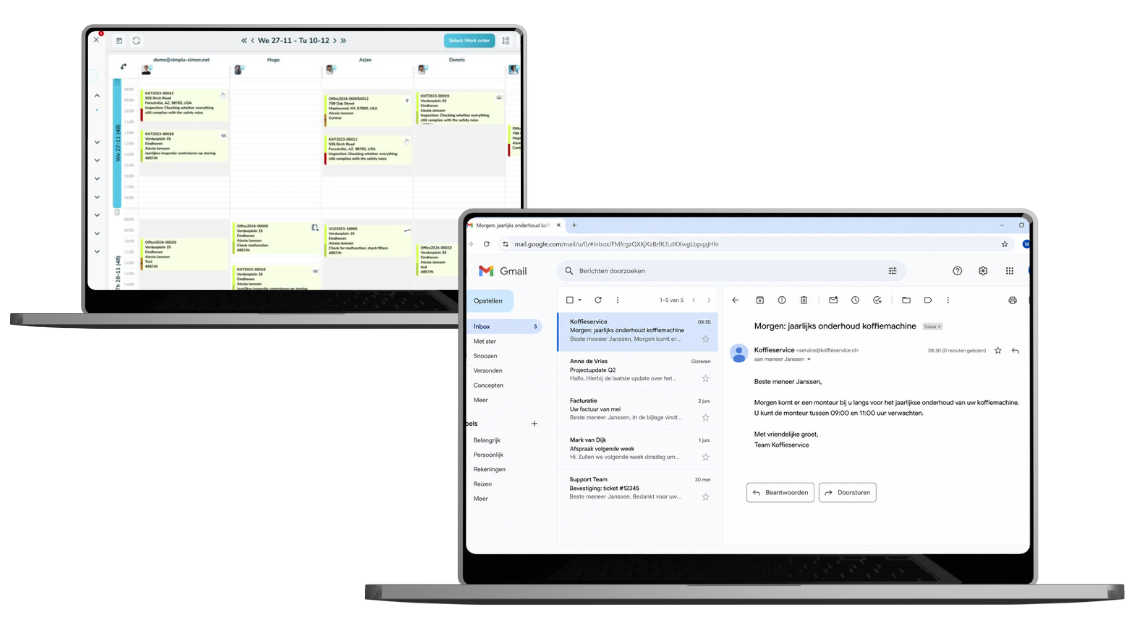

Automatische onderhoudsplanning met planbord en e-mailmelding.

Per job sheet type, send the right message

A customer with a service issue wants to know when the engineer will arrive. A customer who is due for annual maintenance first wants to know whether the proposed time works for them. Those are two very different messages, yet most companies still send both manually. Or not at all.

For each job sheet type, you can define which message is sent automatically and when. For a service issue, send a notification when the engineer is on the way. For periodic maintenance, send an invitation that allows the customer to confirm the appointment or suggest another time. For an inspection, send the report as soon as the job sheet is completed.

Servicemonteur voert onderhoud uit aan een koffiemachine.

Your planner’s knowledge is now built into the system

Not every engineer can carry out every type of job. Some work requires a senior engineer, while other jobs need someone with VCA certification or specific product knowledge. As long as the planner knows exactly who can do what, that works fine.

Link a skill to a job sheet type and the Planboard knows it too. When scheduling a job, you can immediately see who is qualified to carry it out. That helps prevent unnecessary return visits and, for certified work, gaps in your audit trail.

The estimated duration per job sheet type does the same for your daily planning: two hours for a service issue, eight hours for an installation. You start with a realistic schedule instead of an estimate that varies from one planner to another.

Monteurs aan het werk met machines in een technische werkplaats.

Recurring work that schedules itself

Contract visits, periodic checks and regular service visits always come back, but no one gets a reminder. So someone keeps a list or a separate spreadsheet, until something gets missed. You only notice when the customer calls to ask why nobody has visited them yet this year. And a maintenance contract only has value if the service visit actually takes place.

With the service schedule in Job Sheet PRO, you define a maintenance schedule for each job sheet type: which work needs to recur and how often. Every year, every other year, quarterly or monthly, per customer or work address. Simon then automatically suggests the recurring job sheets well before they are due, with the checklist, icon and estimated duration for that type already included. You confirm what works and reschedule what doesn’t.

This way, you look ahead to upcoming contract visits instead of looking back at the ones you missed. You can fill quieter weeks with work that has already been paid for, while your customer sees that you take the initiative.

The service schedule requires the Job Sheet PRO module.

Simple-Simon werkbon software voor het instellen van werkbontypes en onderhoudswerkzaamheden.

What you define for each job sheet type

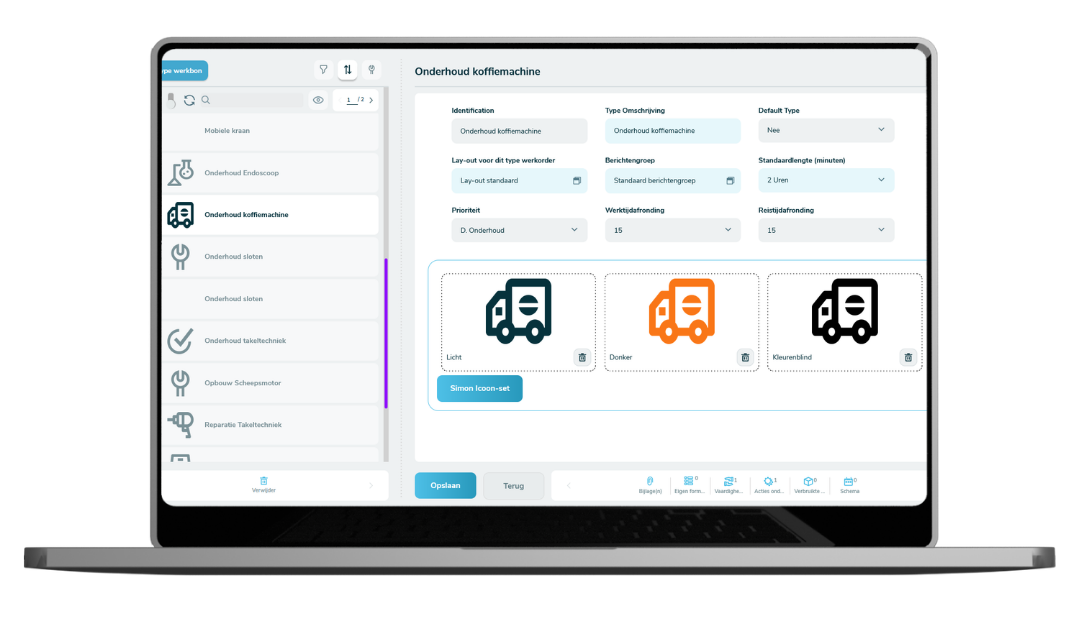
You’re not tied to any predefined types. You create them yourself, using your own terminology, and adjust them whenever your work changes. In addition to what’s shown in the table, you can also define the PDF layout and Planboard icon for each type, so you can see at a glance what kind of work is scheduled that day.

A job sheet type is more than just a label on your job sheet. Here’s what that looks like for the most common types of work:

Job sheet type Forms and checklist Required skill Message to the customer
Service issue Service form with cause and solution None Notification that the engineer is on the way
Installation Commissioning report and handover checklist Qualified for installation Confirmation with date and time of day
Periodic maintenance Maintenance checklist with measurements None Invitation that the customer can confirm or reschedule
Inspection Inspection report with required fields Certified inspector Report sent automatically after completion
Refrigerant leak Leak inspection form and logbook entry F-gas certified Confirmation with logbook entry
Contract visit Contract checklist based on the agreement None Invitation sent well before the contract date
Quote Client Case Simple Simon

What job sheet types deliver in practice


  • You plan your day with a realistic duration for each job instead of relying on estimates that differ by planner.
  • You automatically send your customer the right message for that type of work, at the right time.
  • You never have to search for the right attachments and forms again, because they’re linked to the job sheet type.
  • You get complete job sheets back because your engineer only sees the fields relevant to that type of work.
  • You never miss another contract visit because the service schedule suggests them in advance.
  • You can invoice faster because fewer job sheets come back needing corrections first.


Simple-Simon medewerker geeft een live demo van de werkbon app aan bezoekers op een vakbeurs.

How to set up your job sheet types

It may sound like a big project, but most companies spend no more than two days setting it up. Start small and expand once you see what works.

Step 1. Write down the types of work you actually do

Not the types you want to create in the system, but the work you really carry out. Installation, service issues, periodic maintenance, inspections, handovers, warranty work. Start with the four or five types that make up most of your job sheets.

Step 2. Define what is different for each type

Which form belongs to it, which checklist must not be forgotten, how long the job usually takes and who is qualified to do it. This is the conversation you would normally have with your planner every week. Now you only need to have it once.

Step 3. Set it up in Simon

Create the job sheet types and link the forms, layout, duration, required skill, icon and customer message to each one. From that moment on, whoever creates the job sheet only needs to select the right type.

Step 4. Add recurring work to the service schedule

Define which work repeats and how often. From then on, the suggestions automatically appear in Simon, ready for you to confirm and schedule.

Need help setting it up?
Our consultants can set up the job sheet types together with you, so everything is configured quickly and correctly.

Schedule a session with our consultants

Frequently asked questions about Job Sheet PRO

Is Job Sheet PRO included in the standard package?

Job Sheet PRO is an additional module on top of Simple-Simon. The standard package starts at €30 per user per month, with the PRO module added on top.

You can try it free for two weeks, and there is no contract, so you can cancel monthly. Ask for the current additional price via the pricing page or during the demo.

Start today with Simple-Simon

Plan a demo or start a 2 week trial

Complete for €30  per month, per user

Try for freeStart a demo

“Our company has been using this app for a very long time, and now with the new 3.0 version, it works even better. Thanks a lot!”

Aktie Totaalinstallateurs B.V.

★★★★★
★★★★★
4.8/5 rated