VCA

VCA App: Automatically Attach the Right Safety Form to Every High-Risk Job Sheet

You send an engineer to a job where work at height is required. Has the LMRA form been completed? Are you sure they hold the correct VOL-VCA certification for this type of work? And if an audit takes place, where are the signed safety forms from the last few months?

With the Simple-Simon VCA app, that uncertainty disappears. The system automatically links the correct safety form to the job sheet based on the type of work being carried out. Your engineer sees the form immediately on their phone, completes it on-site and signs it digitally. The office receives it instantly and can always find it again later.

The VCA app is fully integrated with the job sheet app: the safety form is a fixed part of the job sheet, not a separate attachment that can be forgotten.

Book a demo

What is a VCA App?

A VCA app is a mobile application that allows engineers and field service employees to complete, sign and archive safety forms digitally. Examples include an LMRA (Last Minute Risk Assessment) before starting a high-risk job, a TRA (Task Risk Assessment) for planned hazardous activities, or an HSE inspection form for periodic safety inspections.

In the Simple-Simon VCA app, the correct form automatically appears on the engineer’s job sheet based on the type of work being carried out. There is no need to manually check whether the form has been completed — the system does that for you.

Unlike standalone PDFs or paper forms, everything is digitally recorded with a timestamp and digital signature, linked directly to the job sheet and instantly available during audits or internal inspections.

VCA

Link VCA Skills and Certificates to Your Team

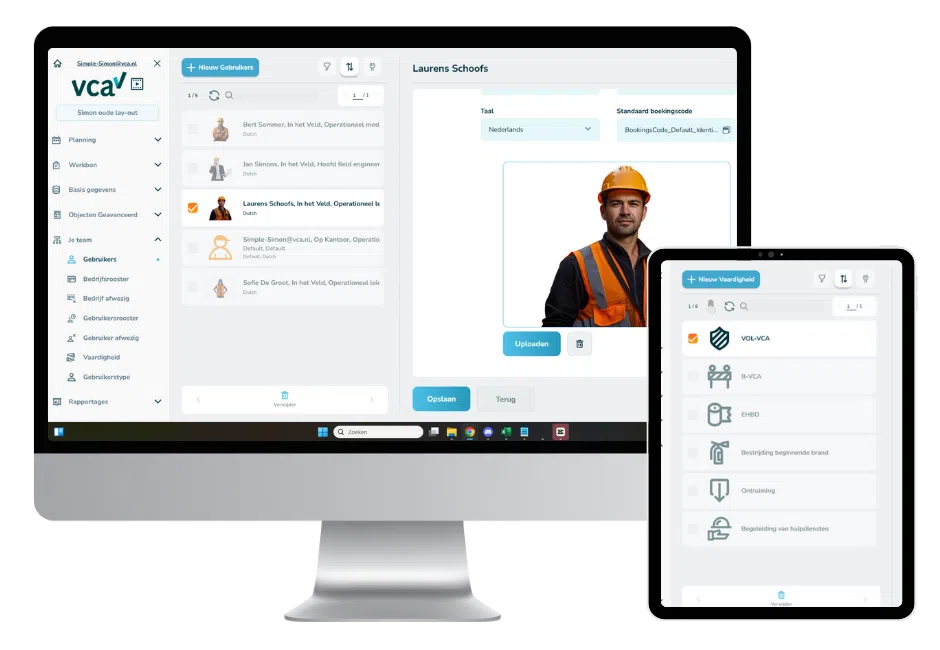
For each employee, you record which VCA certificates they hold, which safety training courses they have completed and which risk situations they are qualified to work in. This allows planners to immediately see who is suitable for a particular type of job when scheduling work.

Configure Skills Per Employee

You add the relevant qualifications for each employee, such as VOL-VCA or B-VCA certification, First Aid certification, authorisation to work at height, asbestos awareness training, or confined space authorisation.

Using the digital planning board, planners can instantly see which employees are available and have the required qualifications for the job they want to schedule. This ensures you never send an engineer without the proper certification to a high-risk location.

Certificate Expiry Dates and Alerts

You record the expiry date of every certificate in the system. This allows you to see in advance when an employee needs to renew their VCA certification or complete refresher training.

Your planning automatically takes current certificate status into account, preventing situations where you only discover afterwards that an engineer was working with an expired qualification.

Why Choose Simple-Simon as Your VCA App?

  • Your engineers always have the correct safety form available on their phone, even without an internet connection. As soon as they are back online, everything automatically synchronises with the office.
  • You can clearly demonstrate compliance with VCA requirements: every form is archived with a timestamp and digital signature, ready for audits and internal inspections.
  • You always schedule the right engineer for the job: skills and certificates are visible during planning, ensuring you never send an uncertified engineer to a high-risk location.
  • You can connect the VCA app to your ERP or accounting software, allowing hours, materials and forms to flow automatically through your processes. Explore all integrations for your software package.

Who Is a VCA App For?

The Simple-Simon VCA app is designed for SMEs with field service teams working in high-risk environments who need to demonstrate that the correct safety procedures have been followed. Typical users include:

  • Installation companies working at height, with electricity or in confined spaces, where an LMRA or TRA is required before work begins.
  • Infrastructure companies and ground workers that operate under VCA requirements and need to prove that safety checks have been completed for every job.
  • HVAC and refrigeration engineers who maintain F-gas records and need to document work per installation and per engineer.
  • Maintenance companies with service contracts that perform periodic HSE inspections and need to archive the results per asset and customer.
  • Businesses working with subcontractors or external engineers that want to centrally manage safety forms without giving external workers access to the full administration.

Frequently Asked Questions About the VCA App

What is a VCA app?

A VCA app is a mobile application that allows engineers to complete and sign safety forms digitally while on-site. In Simple-Simon, the correct form automatically appears on the job sheet based on the type of work being carried out. Forms are archived with timestamps and digital signatures, ready for audits and inspections.

Which safety forms does Simple-Simon support?

Simple-Simon supports all common safety forms, including LMRA (Last Minute Risk Assessment), TRA (Task Risk Assessment) and HSE inspection forms. You create the forms yourself using the built-in forms module and decide which form should automatically appear for specific job sheet types.

What is the difference between a VCA app and VCA software?

A VCA app is the mobile tool engineers use on-site to complete, sign and record safety forms.

VCA software is the broader system in which you manage your safety processes, including certificate registration, reporting, archiving and ERP integrations.

Simple-Simon provides both: the mobile app for engineers and the management platform for the office.

Does the VCA app work offline?

Yes. Engineers can complete and sign forms even without an internet connection, including at remote locations without coverage. The data automatically synchronises as soon as connectivity returns, making the forms immediately available to the office.

How do I register VCA certificates for employees?

You record VCA certificates, qualifications and expiry dates for each employee within Simple-Simon. During planning, you can immediately see who holds the required certifications for the job.

You also receive notifications when certificates are close to expiring, allowing you to take action in time.

What does the Simple-Simon VCA app cost?

Simple-Simon is available from €30 per user per month.

The VCA forms functionality is included in the platform.

No contracts. No minimum number of users. Try it free for 14 days.

Start Working More Safely Today

Curious how your service business can work more efficiently and safely while complying with VCA standards? Request a free demo today or get in touch with us. Our specialists will show you how to automate your VCA processes in just a few clicks — and ensure your engineers never forget another safety checklist.

🔒 VCA-compliant. Digital. Efficient with Simple-Simon.

Book a Live Demo  Contact Sales

Start today with Simple-Simon

Plan a demo or start a 2 week trial

Complete for €30  per month, per user

Try for freeStart a demo

“Our company has been using this app for a very long time, and now with the new 3.0 version, it works even better. Thanks a lot!”

Aktie Totaalinstallateurs B.V.

★★★★★
★★★★★
4.8/5 rated